
You don’t need a paid SEO tool to find long-tail keywords. Google hands you most of what you need for free: autocomplete, People Also Ask and, if you have a website, Search Console. The skill is knowing where to look, then checking there’s real demand before you spend a day writing.
This guide shows you how to find long-tail keywords for free, step by step, using a real kitchen showroom example from the Isle of Wight. It’s where we start our own research at Suki Marketing, before any paid tool comes out.
What are long-tail keywords (and why do they matter for a small business)?
Long-tail keywords are longer, more specific search phrases, usually three words or more, such as “kitchen fitters isle of wight” rather than “kitchens”. Fewer people search for each one, but the people who do tend to know exactly what they want. For a small business, that often means less competition and enquiries from people closer to buying.
Think about the difference between someone typing “kitchens” and someone typing “kitchen worktops isle of wight”. The first could be browsing Pinterest. The second has a job to do and a postcode to do it in.
You won’t build a business on one long-tail keyword. The win comes from a page that answers a cluster of them well, so it picks up dozens of small, specific searches that add up.
How to find long-tail keywords for free: the short answer
Type a short phrase for what you sell into Google and note the autocomplete suggestions. Add letters, question words and an underscore to draw out more. Collect the People Also Ask questions, check Search Console for longer searches you already appear for, then confirm there’s demand before you write anything.
- Pick a seed phrase. Two or three words that describe what you sell, such as “kitchen showroom”.
- Mine autocomplete. Note every suggestion, then repeat with letters, question words and an underscore.
- Collect questions. Open People Also Ask and the related searches at the bottom of the results page.
- Check what you already rank for. Filter Search Console for longer queries.
- Sense-check demand and intent. Use Google Trends and a quick look at who ranks, then group your keywords by page.
Method 1: Google autocomplete
Google autocomplete is the drop-down list of suggestions that appears as you type into the search bar. It’s free, it’s instant, and every suggestion comes from what real people search on Google. That makes it the best place to start when you want to find long-tail keywords for free.
How does Google autocomplete work?
Google autocomplete predicts what you’re typing based on real searches made on Google. According to Google, it also takes account of the language you search in, where you are, trending interest in a topic and, if you’re signed in, your own past searches. That’s why it’s brilliant for keyword ideas, but not a measure of how many people search.
Google also filters out predictions that break its policies, such as violent, sexually explicit or hateful suggestions. So you won’t see everything people type, only what Google is happy to suggest.
Get a clean set of suggestions
Your own searches can colour what you see, so set up before you start:
- Open a private or incognito window, or sign out of your Google account.
- Search on google.co.uk if your customers are in the UK.
- Type your seed phrase slowly and screenshot or copy the list before pressing Enter. Once you hit Enter, the suggestions disappear.
Autocomplete leans heavily on where you are. If you want ideas for a different town, add the town name to your seed phrase. It’s quicker than a VPN and shows you exactly what people search with that place in mind.
Start broad and see how people search
Start with the simplest description of what you sell. Here’s what Google suggested when we typed “kitchen showroom” from the Isle of Wight in October 2026.
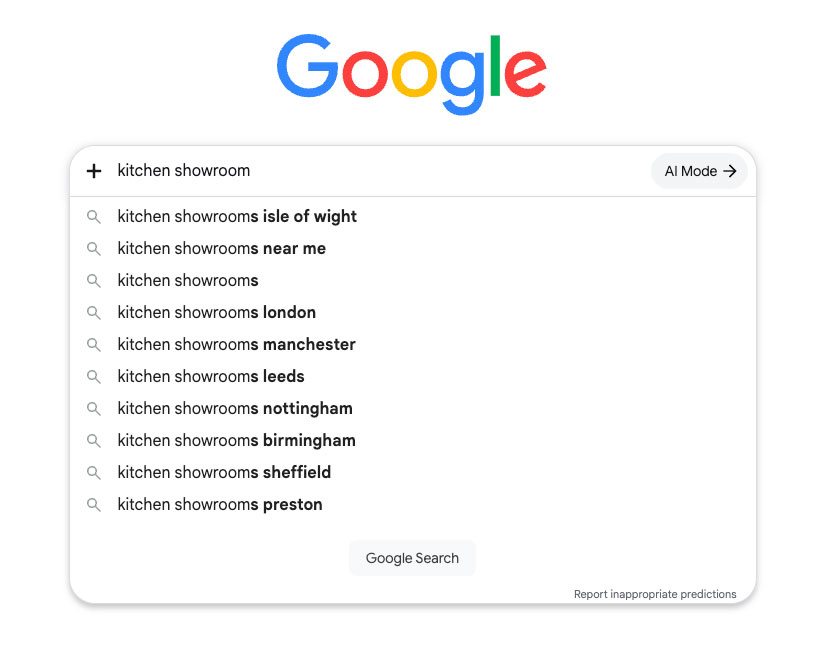
Almost every suggestion is a place: Isle of Wight first, then “near me”, then London, Manchester, Leeds and other cities. That tells you something useful straight away. People search for kitchen showrooms by location, so a showroom’s main page needs its town or county in the title and headings.
Notice too that Google switched our “showroom” to “showrooms”. It’s worth trying singular and plural versions of your seed phrase, as the suggestions can differ.
What a broad seed won’t tell you is what people want to know. For that, you need to push autocomplete a bit harder.
The alphabet method
Type your seed phrase, a space, then a single letter. Google suggests completions that start with that letter. Work through the alphabet and you’ll uncover ideas you’d never brainstorm on your own.
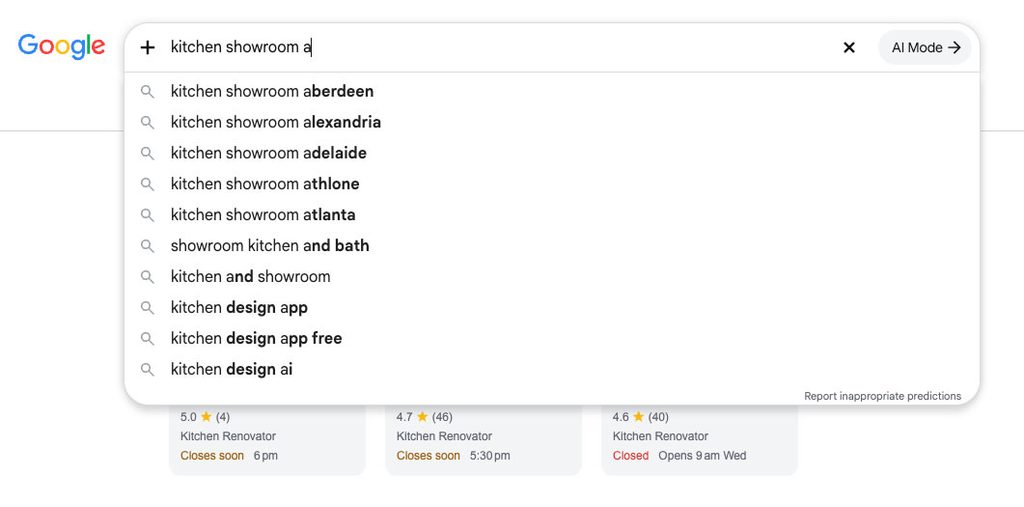
Our “a” search was mostly noise: Aberdeen, Alexandria, Adelaide, even Atlanta. Autocomplete clearly isn’t limited to the UK. But tucked in at the bottom were “kitchen design app”, “kitchen design app free” and “kitchen design ai”. For a showroom, that’s a ready-made blog post about planning a kitchen online before visiting in person.
The lesson: the alphabet method throws up a lot of rubbish, but the gems are worth the sift.
Fill in the blank with an underscore
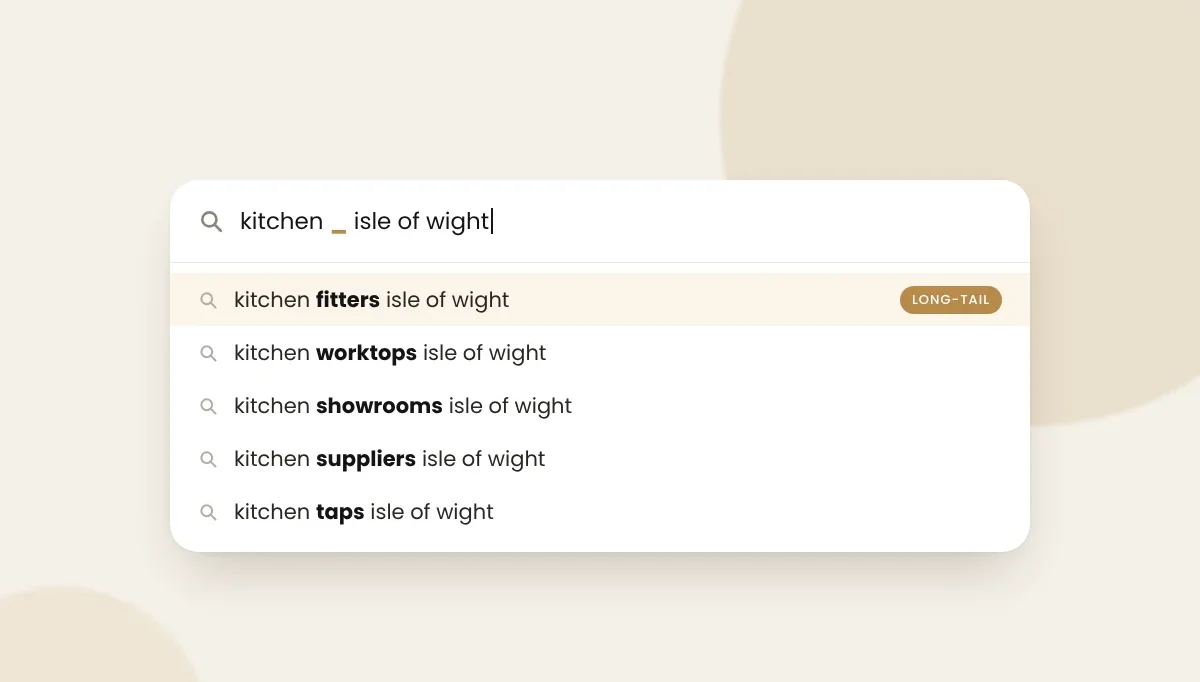
Put an underscore where a missing word would go, for example “kitchen _ isle of wight”, and don’t press Enter. Google fills the gap with words people actually use.
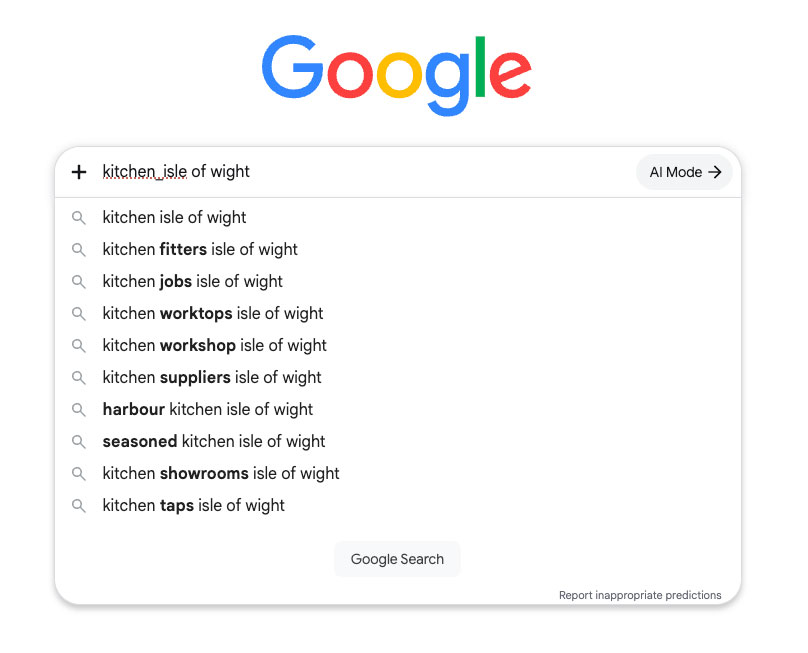
This one’s a goldmine. Google filled the gap with fitters, worktops, suppliers, showrooms and taps. Each is a service or product a local kitchen business could build a page or section around.
It also suggested “kitchen jobs” and a couple of local restaurants. They’re real searches, just not ones a showroom wants to rank for. Always filter suggestions for intent before they go on your list.
Add question words and modifiers
Adding a word before or after your seed phrase changes what Google suggests. Each type of modifier tends to reveal a different kind of search.
| Add this | Example | What it reveals |
|---|---|---|
| how, why, what, can | how much does a new kitchen cost | Questions to answer in blog posts and FAQs |
| best, top | best kitchen worktop for hot pans | Comparison and buying-guide topics |
| vs | quartz vs granite worktops | Comparison posts |
| cost, price | kitchen fitting cost | Pricing pages and guides |
| near me, a town name | kitchen fitters isle of wight | Local pages for your local SEO |
| for | kitchens for small spaces | Audience and situation-specific content |
| without | new kitchen without appliances | Alternatives people are looking for |
Autocomplete is coming to AI Mode
In our screenshots, Google’s AI Mode button sits right next to the search box. In June 2026, Google was spotted testing autocomplete inside the AI Mode follow-up box too, so suggestions appear as you type a follow-up question.
As of October 2026, it’s one to watch rather than a research tool. The takeaway is the same, though. The questions people ask AI are longer and more conversational, which is exactly what long-tail keywords are. If you’re thinking about showing up in AI search results, the questions you collect here are a good place to start.
Method 2: People Also Ask and related searches
People Also Ask is the box of expandable questions Google shows in many search results. Each question is a long-tail search in its own right, phrased the way real people ask it. Click one open and Google usually adds more below it, so a single search can give you a whole list of questions to answer.
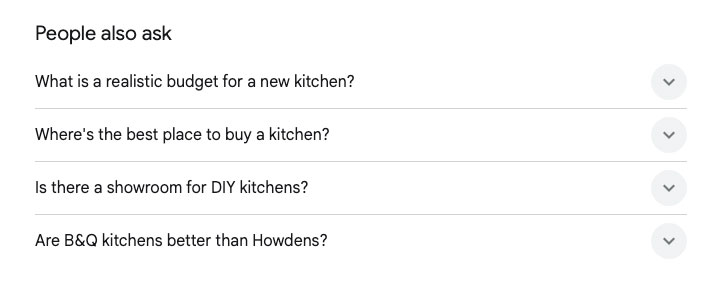
When we searched “kitchen showroom”, Google asked what a realistic budget for a new kitchen is, where the best place to buy a kitchen is, whether there’s a showroom for DIY kitchens, and how two big high-street brands compare.
Every one of those is a blog post or FAQ a showroom could write. A budget question in particular is gold: it’s asked by someone planning a kitchen, not just browsing photos.
Don’t stop at the top of the page. Scroll to the bottom of the results for the related searches, which work like a second round of autocomplete.
Method 3: Google Search Console (the long searches you already show up for)
If you have a website, Google Search Console shows the exact searches your pages already appear for, free. Filter it for longer queries and you’ll often find long-tail keywords you’re nearly ranking for. Improving the page that half answers them is usually quicker than writing something new.
Here’s how to pull them out:
- In Search Console, open Performance, then Search results.
- Set the date range to the last 3 months, then open the Queries tab.
- Click Add filter, choose Query, then Custom (regex).
- Paste this, which shows queries of five words or more:
^(\S+\s+){4,}\S+$ - Sort by Impressions and look for queries with an average position of roughly 8 to 30.
Those are searches Google already connects with your site, just not strongly enough to send many clicks. When we ran this on our own site, it showed our old autocomplete guide appearing for “how does google autocomplete work”, but nowhere near page one. That’s partly why we rewrote it.
Google’s regex filter uses RE2 syntax, so most simple patterns you find online will work.
Method 4: Your customers’ own words
Some of the best long-tail keywords never appear in a tool, because they live in your inbox. Look at:
- Enquiry emails and contact form messages. How do people describe what they want before they’ve spoken to you?
- Notes from phone calls. Which questions come up every week?
- Your reviews and your competitors’ reviews. What do customers praise or complain about, in their words?
- Reddit, Mumsnet and Facebook groups. Search your topic and note the questions people ask strangers rather than businesses.
Then type those phrases into Google and see what autocomplete does with them. Real customer language plus autocomplete is a powerful combination, and it’s something no competitor’s tool can copy.
Check there’s demand before you write
Autocomplete tells you people search for something, but not how many. Google says this itself: its predictions aren’t a simple list of the most popular searches, and it points to Google Trends for that. Before you write, check a phrase has steady interest and that the right kind of page ranks for it.
Free ways to sense-check demand:
- Google Trends. Compare two or three phrases, set the location to the United Kingdom, and see which has steadier interest. Very specific long-tail phrases often have too little data to chart. That’s normal and doesn’t mean nobody searches for them.
- Google Keyword Planner. It’s free with a Google Ads account. Unless the account is running ads, it shows broad ranges, such as 1,000 to 10,000 searches a month, rather than exact figures. Ranges are still enough to tell a tiny phrase from a busy one.
- Search Console after you publish. The real test. Give a new page a few weeks, then check which searches it appears for.
Our rule of thumb: if Google suggests it, real people have searched for it. Low volume isn’t a reason to skip a long-tail keyword if it brings the right customer. One booked kitchen design appointment beats a thousand visitors who were never going to buy.
Worked example: long-tail keywords for an Isle of Wight kitchen showroom
Here’s how the screenshots above turn into a content plan for an independent kitchen showroom on the Isle of Wight. It took four searches and no paid tools.
| Keyword idea | Where it came from | What the searcher wants | Best place to target it |
|---|---|---|---|
| kitchen showrooms isle of wight | Autocomplete | To find and visit a local showroom | Home page or main showroom page |
| kitchen fitters isle of wight | Underscore trick | Someone to fit a kitchen | Fitting service page |
| kitchen worktops isle of wight | Underscore trick | To compare and buy worktops locally | Worktops page |
| kitchen taps isle of wight | Underscore trick | To buy taps locally | Section on a products page |
| what is a realistic budget for a new kitchen | People Also Ask | To plan costs before shopping | Blog post: kitchen budget guide |
| is there a showroom for DIY kitchens | People Also Ask | To see DIY options in person | FAQ on the showroom page |
| kitchen design app free, kitchen design ai | Alphabet method | To plan a kitchen online first | Blog post: planning your kitchen online, then visiting us |
| big-brand comparison question | People Also Ask | To compare high-street options | Blog post: independent showroom or big-box store? |
And what we’d leave out: “kitchen jobs” (job seekers), the restaurant names (people looking for lunch) and the cities hundreds of miles away.
Notice how the list splits naturally. Local, ready-to-buy searches belong on service pages. Questions belong in blog posts and FAQs. That split is what turns a list of keywords into a website people can find.
How to choose which long-tail keywords to target
Pick long-tail keywords that match what you sell, where the searcher wants something you can give them, and where the current results look beatable. Then group close variations together, so one strong page answers several related searches instead of several thin pages competing with each other.
Run each idea through four quick checks:
- Is it relevant? Would you be happy if this searcher contacted you? If not, drop it, however tempting the volume.
- What’s the intent? Google the phrase. If the top results are shops, people want to buy. If they’re guides, people want to learn. Match the type of page that’s already ranking.
- Does it look beatable? Low-competition long-tail keywords often show forum threads, Reddit posts, thin pages or outdated articles in the top results. That’s an opening, though not a guarantee.
- Which page does it belong on? If two phrases would get the same answer, they go on the same page.
Once you have your groups, the next job is turning keywords into SEO content that answers each question properly.
When free methods stop being enough
For a small business site with a few dozen pages, free methods will get you a long way. Paid tools earn their keep when you need search volumes and difficulty scores at scale, want to see which keywords competitors rank for, or are managing several sites.
The honest answer is that the method matters more than the tool. We use paid tools every day, but we still start with autocomplete and People Also Ask, because that’s where the real language is.
If you’re weighing up doing your own SEO, keyword research is one of the best places to start. If you’d rather spend your time running the business, it helps to know what SEO costs in the UK before you talk to anyone.
Want us to do the digging for you?
Keyword research is one of those jobs that’s simple to start and easy to lose a whole afternoon to. If you’d rather hand it over, we’ll find the long-tail keywords your customers actually use and turn them into pages that bring in enquiries. No jargon, no hard sell.
Book a free 30-minute call, or take a look at our SEO content written for you.