Your SEO plugin has flagged “missing H1”. Or you’ve searched for your own business and Google is showing a page title you never wrote. Either way, something’s telling you your headings are wrong, and you want to know how much that actually matters.
Here’s the honest answer: heading tag mistakes rarely sink a website on their own, but they make your pages harder for Google, AI search tools and your visitors to understand. Most are quick fixes, not rebuilds. And in the spirit of full transparency, the last version of this very post had no H2s at all. Every section was an H3 or H4. We’ve fixed it, and we’ll show you how to check yours.
Do headings and title tags actually matter for SEO?
Yes, but not as much as most SEO checklists suggest. Headings help Google understand what each section of a page covers, and your title tag is the main source for the clickable headline in search results. Neither is a magic ranking switch. Get them wrong, though, and your page is harder to read for people and search engines alike.
Headings (you’ll also hear them called header tags or H tags) run from H1 down to H6. Google’s John Mueller has said a page can rank perfectly well with no H1 or with several. What Google does say clearly, in its own Search Central documentation, is that it uses your title tag, your main heading and other prominent text on the page to decide what headline to show in results.
So a messy structure won’t get you “penalised”. It just means you have less say over how your page looks in Google, and that affects whether anyone clicks (which is where enquiries start).
There’s a human side too. People using screen readers jump from heading to heading to find their way around a page, much like you’d skim the subheadings in a newspaper. Muddled headings make that much harder.
Title tag vs H1: what’s the difference?
Your title tag is the headline shown in Google’s results and on the browser tab. Your H1 is the main heading visitors see on the page itself. They describe the same thing, so they should agree, but they don’t have to match word for word. The title earns the click; the H1 confirms the visitor is in the right place.
| Title tag | H1 | |
|---|---|---|
| Where it appears | Google results, browser tab, social shares | On the page, usually at the top |
| Who reads it | Searchers deciding whether to click | Visitors already on your page |
| How many per page | One | One is best practice |
| Where you edit it (WordPress) | Your SEO plugin | Your page editor |
On WordPress, you’ll set the title tag in Rank Math or Yoast, and the H1 in the page editor itself.
How to check your own website in five minutes
You don’t need to read any code. Install a free Chrome extension such as SEO Meta in 1 Click, open the page you want to check and click the icon. It shows your title tag, meta description and every heading in order, so you can spot a missing H1 or a jumbled structure in seconds.
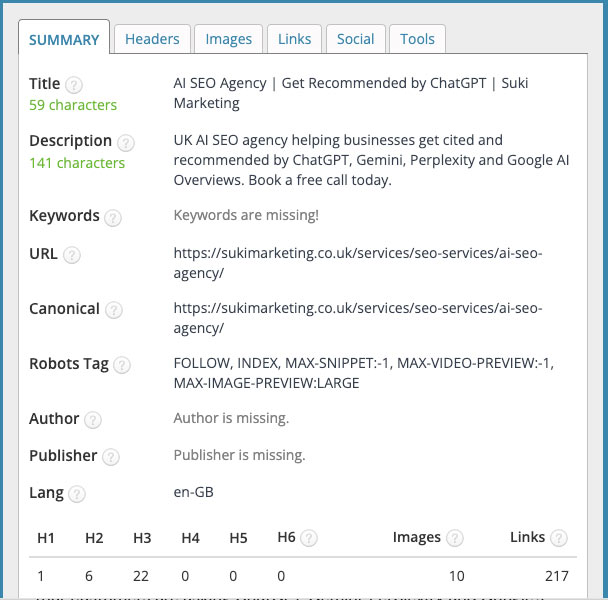
Check your title tag
- Open the extension and look at the title line.
- Ask yourself: is it specific to this page, and does it say what you do (and where, if you’re local)?
- If it just says “Home”, your business name, or the same thing as three other pages, add it to your fix list.
Check your headings
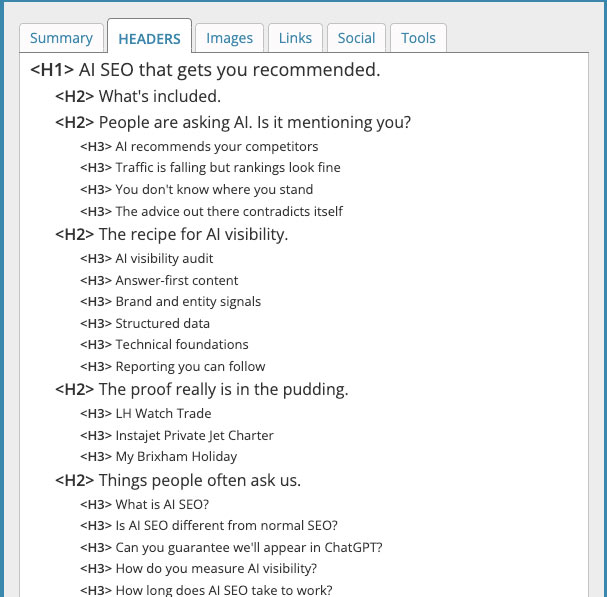
- Open the Headers tab in the extension.
- You’re looking for one H1 near the top that names the page’s topic, then H2s for the main sections, with H3s sitting under them.
- Make a note of anything odd: several H1s, your logo listed as a heading, or a heading that’s just “Call us today”.
Check what Google actually shows
Search Google for the page (or type site:yourdomain.co.uk to see them all). If the headline in the results is different from your title tag, Google has rewritten it. We’ll cover why that happens further down.
The most common heading tag mistakes (and how serious each one is)
The most common heading tag mistakes are choosing headings for their size rather than their role, having no H1 or several, skipping levels, and writing vague or duplicate title tags. Most take minutes to fix in your page editor or SEO plugin. Here’s how serious each one really is, so you know where to start.
| Mistake | How serious | Usually fixed in |
|---|---|---|
| Headings chosen for size, not structure | Fix now | Page editor |
| No H1, or an H1 that says “Welcome” | Fix now | Page editor |
| Vague, duplicate or name-only title tags | Fix now | SEO plugin |
| Keyword stuffing | Fix now | SEO plugin and page editor |
| Several H1s on every page | Fix when convenient | Theme or header template |
| Skipped levels and decorative headings | Tidy up when you next edit | Page editor |
Headings chosen for size, not structure
This is the root of most heading problems we see. Page builders like Elementor let you pick any heading level for any bit of text, so it’s tempting to choose an H2 because it looks the right size, not because it starts a main section.
The result is testimonials, footer text and “Get in touch” buttons all marked up as headings. The fix is simple: set the level by its role on the page, then change the size in the styling settings.
No H1, or an H1 that says “Welcome”
Your H1 should tell people (and Google) exactly what the page is about. “Welcome to our website” doesn’t. Neither does your logo, which some themes set as the H1 on every page.
A good H1 for a service page sounds like what a customer would search for: “Fitted kitchens on the Isle of Wight” beats “Our services” every time.
Several H1s on every page
Google has said its systems can handle more than one H1, so this one won’t tank your rankings. It does blur the message about what the page is really about, for visitors, for screen readers and for Google picking your headline.
We recently audited a property client’s website where every single page carried at least three H1s. This was an issue caused where ‘H1’ seemed to deliver a different sized text that seemed suitable for the page. Partly down to the website design, partly down to a misunderstanding of SEO heading tags.
When it happens on every page like this, it’s usually coming from the theme or header template, so one fix can often clear the whole site.
Skipped levels and headings used as decoration
Jumping from an H1 straight to an H4, or using headings purely to make text bold, makes your page’s outline harder to follow. It’s not urgent, but tidy it up next time you edit the page. Think of it like the contents page of a book: chapters, then sections, then subsections.
Vague, duplicate or name-only title tags
A title tag of “Home” or “Kitchens | Smith & Co” tells searchers very little. Compare it with “Fitted kitchens in Newport, Isle of Wight | Smith & Co”. The second says what, where and who, which is exactly what someone scanning Google wants to know.
Duplicates are the other trap: if five pages share the same title, Google has no easy way to tell them apart, and it’s more likely to write its own.
On length, Google doesn’t set a character limit; it just cuts titles off to fit the screen. Around 50 to 60 characters keeps yours whole on most devices. As long as it isn’t a single word or a verbatim copy of Moby Dick, you’ll be fine.
Keyword stuffing
“SEO Isle of Wight | Isle of Wight SEO | Best SEO IOW” reads like spam, because it is. Google may rewrite a title like that, and people are far less likely to click it.
Use your main phrase once, naturally. Getting more specific does far more work than repetition: long-tail keywords like “bathroom showroom near Ryde” have far less competition than “bathrooms”.
Headings and titles are only two parts of the picture. If you want to work through the rest of your on-page checks, meta descriptions, internal links and images are the next places to look.
Why is Google showing a different title for my page?
Google writes its own headline when it thinks yours doesn’t describe the page well. Its documentation lists the usual triggers: titles that are half-empty or just a site name, outdated dates, the same boilerplate repeated across pages, titles that don’t match the content, and pages with no clear main heading.
The fix is to give every page a specific, honest title tag and an H1 that agrees with it. Once you’ve made changes, Google has to recrawl the page before anything updates, which can take anywhere from a few days to a few weeks. You can speed things along by requesting indexing in Google Search Console.
Do headings help you show up in AI search?
They help. AI tools like ChatGPT and Google’s AI Overviews pull short passages from web pages to build their answers, and clear, descriptive headings make it easier to find the passage that answers a question. A heading that asks a question, followed by a direct answer, is easy for them to pick up and quote.
Headings are one small piece of showing up in AI search, though. Being a business the AI tools recognise and trust matters far more.
What to ask your web designer
If someone else built your site, you don’t need to fix this yourself. Copy these questions into an email:
- Does every page have one H1 that describes that page?
- Is the logo or any banner text set as a heading, and can it be changed to normal text?
- Are heading levels chosen by structure, with sizes set in the styling?
- Does every page have its own title tag in the SEO plugin?
- Can you send me a list of pages with missing or duplicate titles?
A good web designer will be glad you asked. If they aren’t, that tells you something too. And if you’re planning a rebuild anyway, getting this right from day one is part of our WordPress web design as standard.
Want us to check it for you?
If you’d rather not poke around in heading levels, the team at Suki Marketing – an SEO and web design agency on the Isle of Wight – will do it for you. Book a free 30-minute call and we’ll look at your headings and title tags with you, tell you honestly what matters and what doesn’t, and leave you with a list you or your web designer can work through. No jargon, no hard sell.
If you’d rather hand the whole lot over, our on-page SEO service covers this and everything else on your pages. You’ll deal directly with the people doing the work, and you can get back to running your business.